---
title: "Build an AI Agent and Workflow with Arcade and Mastra"
description: "Create a TypeScript agent that uses Arcade tools to access Gmail and Slack"
---
import { Steps, Tabs, Callout } from "nextra/components";
[Mastra](https://mastra.ai/docs) is an open-source, TypeScript agent framework for building AI applications. It provides agents with memory, tool calling, workflows, and RAG capabilities. This guide uses **Mastra v1.x**.
In this guide, you'll build an agent lets you read emails, send messages, and interact with Gmail and Slack using Arcade's MCP tools in a conversational interface with built-in authentication. You will also build a workflow that summarizes emails and sends them to Slack.
A Mastra agent and workflow that integrates Arcade tools for Gmail and Slack.
-
- [Node.js 18+](https://nodejs.org/)
- An [OpenAI API key](https://platform.openai.com/api-keys) (or another supported model provider)
- How to retrieve Arcade tools and convert them to Mastra format
- How to create an agent with tool calling capabilities
- How to create a workflow with multiple steps
- How to handle Arcade's authorization flow in your application
- How to test your agent and workflow with Mastra Studio
## Mastra concepts
Before diving into the code, here are the key Mastra concepts you'll use:
- [Mastra Studio](https://mastra.ai/docs/getting-started/studio): An interactive development environment for building and testing agents locally.
- [Zod schemas](https://zod.dev): Mastra uses Zod for type-safe tool definitions.
- [Memory](https://mastra.ai/docs/memory/overview): Persists conversation history across sessions using storage backends like LibSQL.
- [Processors](https://mastra.ai/docs/memory/processors): Transform messages before they reach the LLM. This tutorial uses:
- `ToolCallFilter`: Removes tool calls and results from memory to prevent large API responses from bloating context.
- `TokenLimiterProcessor`: Limits input tokens to stay within model context limits.
## Build an agent
### Create a new Mastra project
```bash
npx create-mastra@latest arcade-agent
```
Select your preferred model provider when prompted (we recommend OpenAI). Enter your API key when asked.
Then navigate to the project directory and install the Arcade client:
```bash
cd arcade-agent
npm install @arcadeai/arcadejs @ai-sdk/openai zod@3
```
```bash
cd arcade-agent
pnpm add @arcadeai/arcadejs @ai-sdk/openai zod@3
```
```bash
cd arcade-agent
yarn add @arcadeai/arcadejs @ai-sdk/openai zod@3
```
```bash
cd arcade-agent
bun add @arcadeai/arcadejs @ai-sdk/openai zod@3
```
These commands explicitly install `zod@3` because the Arcade SDK's `toZodToolSet` currently requires Zod 3.x. Zod 4 has a different internal API that isn't yet supported.
### Set up environment variables
Add your Arcade API key to **.env**:
```env filename=".env"
ARCADE_API_KEY={arcade_api_key}
ARCADE_USER_ID={arcade_user_id}
```
The `ARCADE_USER_ID` is your app's internal identifier for the user (often the email you signed up with, a UUID, etc.). Arcade uses this to track authorizations per user.
### Create the tool configuration
Create **src/mastra/tools/arcade.ts** to handle Arcade tool fetching and conversion.
**Handling large tool outputs:** Tools like `Gmail.ListEmails` can return 200KB+ of email content. When the agent passes this data back to the LLM in the agentic loop, it may exceed token limits, resulting in rate limit errors. The code below includes output truncation to prevent this.
```ts filename="src/mastra/tools/arcade.ts"
import { Arcade } from "@arcadeai/arcadejs";
import {
toZodToolSet,
executeOrAuthorizeZodTool,
} from "@arcadeai/arcadejs/lib";
const config = {
// Get all tools from these MCP servers
mcpServers: ["Slack"],
// Add specific individual tools
individualTools: ["Gmail_ListEmails", "Gmail_SendEmail", "Gmail_WhoAmI"],
};
// Maximum characters for any string field in tool output
// Keeps responses small while preserving structure (subjects, senders, snippets)
const MAX_STRING_CHARS = 300;
/**
* Recursively truncates all large strings in objects/arrays.
* This prevents token overflow when tool results pass back to the LLM.
*/
function truncateDeep(obj: unknown): unknown {
if (obj === null || obj === undefined) return obj;
if (typeof obj === "string") {
if (obj.length > MAX_STRING_CHARS) {
return obj.slice(0, MAX_STRING_CHARS) + "...";
}
return obj;
}
if (Array.isArray(obj)) {
return obj.map(truncateDeep);
}
if (typeof obj === "object") {
const result: Record = {};
for (const [key, value] of Object.entries(obj as Record)) {
result[key] = truncateDeep(value);
}
return result;
}
return obj;
}
export async function getArcadeTools(userId: string) {
const arcade = new Arcade();
// Fetch tools from MCP servers
const mcpTools = await Promise.all(
config.mcpServers.map(async (server) => {
const response = await arcade.tools.list({ toolkit: server });
return response.items;
})
);
// Fetch individual tools
const individualTools = await Promise.all(
config.individualTools.map((toolName) => arcade.tools.get(toolName))
);
// Combine all tools
const allTools = [...mcpTools.flat(), ...individualTools];
// Convert to Zod format for Mastra compatibility
const zodTools = toZodToolSet({
tools: allTools,
client: arcade,
userId,
executeFactory: executeOrAuthorizeZodTool,
});
// Wrap tools with truncation and add 'id' property for Mastra Studio
type ToolType = (typeof zodTools)[string] & { id: string };
const mastraTools: Record = {};
for (const [toolName, tool] of Object.entries(zodTools)) {
const originalExecute = tool.execute;
mastraTools[toolName] = {
...tool,
id: toolName,
execute: async (input: unknown) => {
const result = await originalExecute(input);
return truncateDeep(result) as Awaited>;
},
} as ToolType;
}
return mastraTools;
}
```
#### What this code does
##### Tool fetching
- `mcpServers`: Fetches *all* tools from an MCP server. Use this when you want everything a service offers (for example, `"Slack"` gives you `Slack_SendMessage`, `Slack_ListChannels`, `Slack_ListUsers`, etc.)
- `individualTools`: Fetches specific tools by name. Use this to cherry-pick only what you need (for example, `"Gmail_ListEmails"` without `Gmail_DeleteEmail` or other tools you don't want exposed)
You might select your tools individually for a few reasons:
* **Security** You may not want to expose all the tools a service offers, for instance `Gmail_DeleteEmail` is not necessary and could even be dangerous to expose to an agent designed to summarize emails.
* **Cost** Each tool's schema consumes tokens. Loading all Gmail tools (~20 tools) uses more tokens than loading just the 3 you need. This matters for rate limits and cost.
Browse the [complete MCP server catalog](/resources/integrations) to see available servers and their tools.
##### Arcade SDK functions
- `arcade.tools.list({ toolkit })`: Fetches all tools from an MCP server
- `arcade.tools.get(toolName)`: Fetches a single tool by its full name
- `toZodToolSet`: Converts Arcade tools to [Zod](https://zod.dev) schemas that Mastra requires
- `executeOrAuthorizeZodTool`: Handles tool execution and returns authorization URLs when needed
### Output handling
- `truncateDeep`: Recursively limits all strings to 300 characters to prevent token overflow when tool results are passed back to the LLM
### Create the agent
Create **src/mastra/agents/arcade.ts**:
```ts filename="src/mastra/agents/arcade.ts"
import { Agent } from "@mastra/core/agent";
import { TokenLimiterProcessor, ToolCallFilter } from "@mastra/core/processors";
import { Memory } from "@mastra/memory";
import { LibSQLStore } from "@mastra/libsql";
import { openai } from "@ai-sdk/openai";
import { getArcadeTools } from "../tools/arcade";
const userId = process.env.ARCADE_USER_ID || "default-user";
// Fetch Arcade tools at startup
const arcadeTools = await getArcadeTools(userId);
// Configure memory with conversation history
const memory = new Memory({
storage: new LibSQLStore({
id: "arcade-agent-memory",
url: "file:memory.db",
}),
options: {
lastMessages: 10,
},
});
export const arcadeAgent = new Agent({
id: "arcade-agent",
name: "arcadeAgent",
instructions: `You are a helpful assistant that can access Gmail and Slack.
Always use the available tools to fulfill user requests.
For Gmail:
- Use Gmail_ListEmails to fetch recent emails
- Use Gmail_SendEmail to send emails
- Use Gmail_WhoAmI to get the user's email address
- To find sent emails, use the query parameter with "in:sent"
- To find received emails, use "in:inbox" or no query
- When composing emails, use plain text (no markdown)
For Slack:
- Use Slack_SendMessage to send messages to channels or users
- Use Slack_ListChannels to see available channels
After completing any action, always confirm what you did with specific details.
IMPORTANT: When a tool returns an authorization response with a URL, tell the user to visit that URL to grant access. After they authorize, they can retry their request.`,
model: openai("gpt-4o"),
tools: arcadeTools,
memory,
// Filter out tool results from memory (they can be large) and limit tokens
inputProcessors: [new ToolCallFilter(), new TokenLimiterProcessor({ limit: 50000 })],
});
```
### Register the agent
Replace the contents of **src/mastra/index.ts** with the following to register your agent:
```ts filename="src/mastra/index.ts"
import { Mastra } from "@mastra/core";
import { arcadeAgent } from "./agents/arcade";
export const mastra = new Mastra({
agents: {
arcadeAgent,
},
});
```
### Test with Mastra Studio
Start the development server:
```bash
npm run dev
```
```bash
pnpm dev
```
```bash
yarn dev
```
```bash
bun dev
```
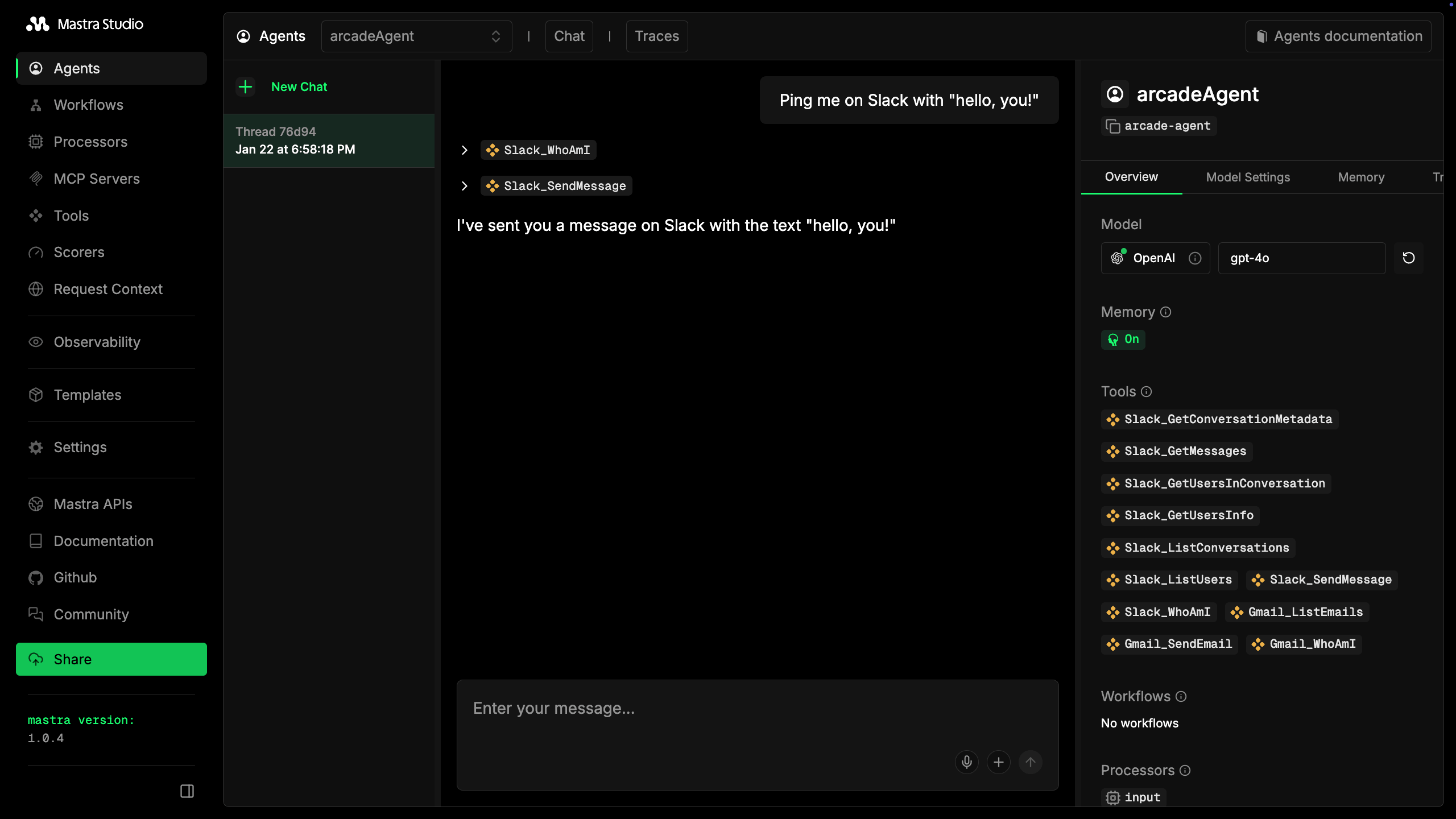
Open [http://localhost:4111](http://localhost:4111) to access Mastra Studio. Select **arcadeAgent** from the list and try prompts like:
- "Summarize my last 3 emails"
- "Send a Slack DM to myself saying hello"
- "What's my Gmail address?"
On first use, the agent will return an authorization URL. Visit the URL to connect your Gmail or Slack account, then retry your request. Arcade remembers this authorization for future requests.
## Build a workflow
Agents are great for open-ended conversations, but sometimes you want a **deterministic process** that runs the same way every time. Mastra workflows let you chain steps together, with each step's output feeding into the next.
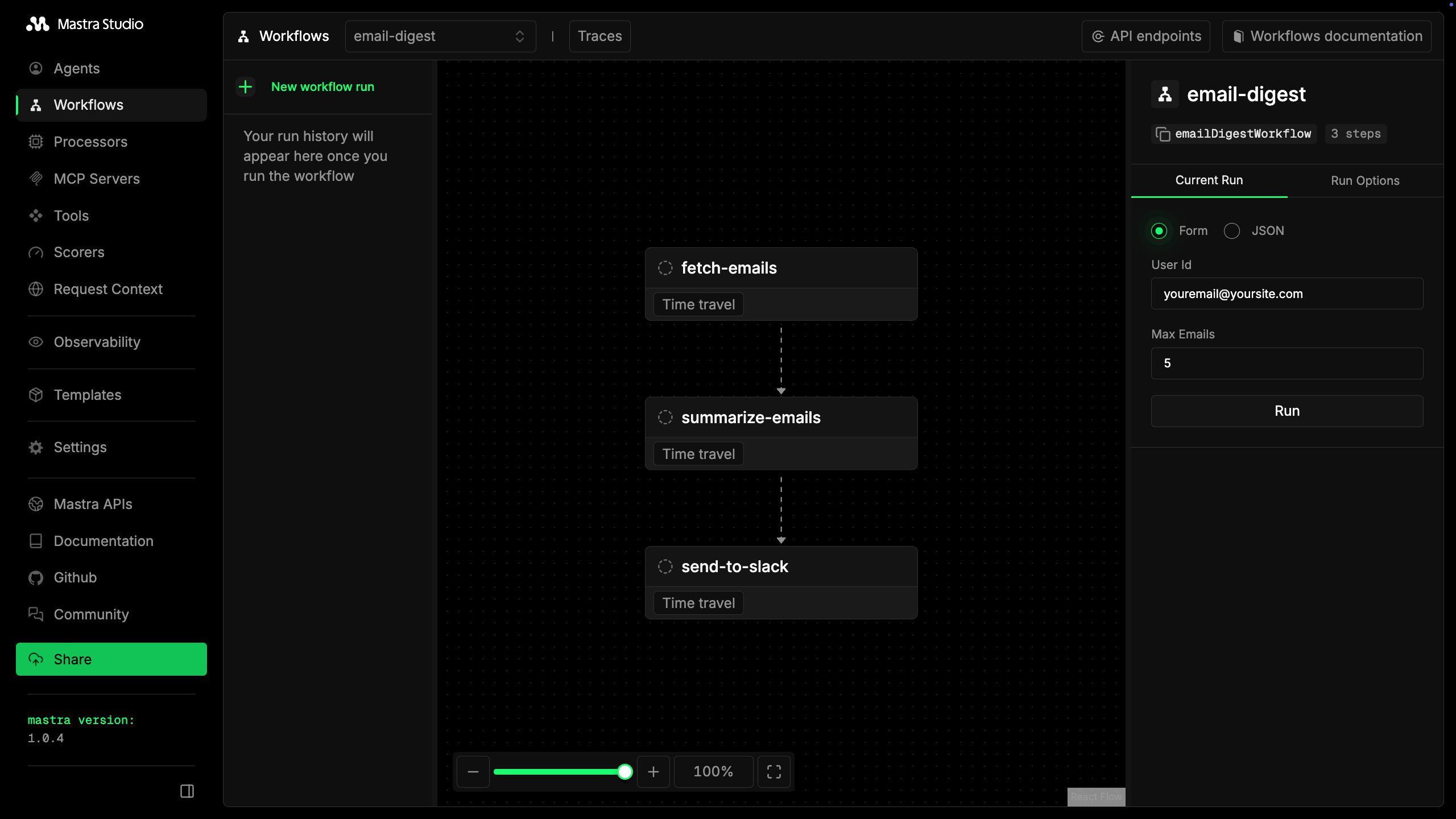
This workflow does the following:
1. Fetches emails from Gmail
2. Summarizes them with an LLM
3. Sends the digest as a direct message to the user on Slack
This also demonstrates how workflows:
* handle **large data** the full email content stays internal to the workflow, and only the compact summary gets sent to Slack.
* handle **authorization errors**
* **pass auth URLs** through multiple workflow steps
### Create the workflow
Create **src/mastra/workflows/email-digest.ts**:
```ts filename="src/mastra/workflows/email-digest.ts"
import { createStep, createWorkflow } from "@mastra/core/workflows";
import { z } from "zod";
import { Arcade } from "@arcadeai/arcadejs";
const defaultUserId = process.env.ARCADE_USER_ID || "default-user";
// Step 1: Fetch emails from Gmail
const fetchEmails = createStep({
id: "fetch-emails",
inputSchema: z.object({
userId: z.string().optional(),
maxEmails: z.number().optional(),
}),
outputSchema: z.object({
emails: z.array(z.object({
subject: z.string(),
from: z.string(),
snippet: z.string(),
})),
userId: z.string(),
authRequired: z.boolean().optional(),
authUrl: z.string().optional(),
}),
execute: async ({ inputData }) => {
const arcade = new Arcade();
const userId = inputData?.userId || defaultUserId;
try {
const result = await arcade.tools.execute({
tool_name: "Gmail_ListEmails",
user_id: userId,
input: { n_emails: inputData!.maxEmails ?? 5 },
});
const response = result as { output?: { value?: { emails?: any[] } } };
const emails = (response.output?.value?.emails || []).map((e: any) => ({
subject: String(e.subject || "(No subject)"),
from: String(e.sender || e.from || "Unknown"),
snippet: String(e.snippet || "").slice(0, 200),
}));
return { emails, userId };
} catch (error: any) {
// Handle authorization required error
if (error.status === 403 || error.message?.includes("authorization")) {
const authResponse = await arcade.auth.start({
user_id: userId,
provider: "google",
scopes: ["https://www.googleapis.com/auth/gmail.readonly"],
});
return {
emails: [],
userId,
authRequired: true,
authUrl: authResponse.url,
};
}
throw error;
}
},
});
// Step 2: Summarize with LLM
const summarizeEmails = createStep({
id: "summarize-emails",
inputSchema: z.object({
emails: z.array(z.object({
subject: z.string(),
from: z.string(),
snippet: z.string(),
})),
userId: z.string(),
authRequired: z.boolean().optional(),
authUrl: z.string().optional(),
}),
outputSchema: z.object({
summary: z.string(),
userId: z.string(),
authRequired: z.boolean().optional(),
authUrl: z.string().optional(),
}),
execute: async ({ inputData, mastra }) => {
const { emails, userId, authRequired, authUrl } = inputData!;
// Pass through auth requirement
if (authRequired) {
return { summary: "", userId, authRequired, authUrl };
}
if (emails.length === 0) {
return { summary: "No new emails.", userId };
}
const agent = mastra?.getAgent("arcadeAgent");
const emailList = emails.map((e, i) =>
`${i + 1}. From: ${e.from}\n Subject: ${e.subject}\n Preview: ${e.snippet}`
).join("\n\n");
const response = await agent!.generate(
`Summarize these emails in 2-3 bullet points:\n\n${emailList}`
);
return { summary: response.text, userId };
},
});
// Step 3: Send DM to Slack user
const sendToSlack = createStep({
id: "send-to-slack",
inputSchema: z.object({
summary: z.string(),
userId: z.string(),
authRequired: z.boolean().optional(),
authUrl: z.string().optional(),
}),
outputSchema: z.object({
success: z.boolean(),
message: z.string(),
authUrl: z.string().optional(),
}),
execute: async ({ inputData }) => {
const { summary, userId, authRequired, authUrl } = inputData!;
// Return auth URL if authorization is needed
if (authRequired) {
return {
success: false,
message: `Authorization required. Please visit this URL to grant access: ${authUrl}`,
authUrl,
};
}
const arcade = new Arcade();
try {
// Get the user's Slack identity
const whoAmI = await arcade.tools.execute({
tool_name: "Slack_WhoAmI",
user_id: userId,
input: {},
});
const slackUserId = (whoAmI as any)?.output?.value?.user_id;
// Send DM to the user
await arcade.tools.execute({
tool_name: "Slack_SendMessage",
user_id: userId,
input: {
message: `📬 *Email Digest*\n\n${summary}`,
user_ids: [slackUserId],
},
});
return { success: true, message: "Digest sent as DM" };
} catch (error: any) {
// Handle Slack authorization required
if (error.status === 403 || error.message?.includes("authorization")) {
const slackAuth = await arcade.auth.start({
user_id: userId,
provider: "slack",
scopes: ["chat:write", "users:read"],
});
return {
success: false,
message: `Slack authorization required. Please visit: ${slackAuth.url}`,
authUrl: slackAuth.url,
};
}
throw error;
}
},
});
// Chain the steps together
const emailDigestWorkflow = createWorkflow({
id: "email-digest",
inputSchema: z.object({
userId: z.string().default(defaultUserId),
maxEmails: z.number().default(5),
}),
outputSchema: z.object({
success: z.boolean(),
message: z.string(),
authUrl: z.string().optional(),
}),
})
.then(fetchEmails)
.then(summarizeEmails)
.then(sendToSlack);
emailDigestWorkflow.commit();
export { emailDigestWorkflow };
```
### Register the workflow
Update **src/mastra/index.ts**:
```ts filename="src/mastra/index.ts"
import { Mastra } from "@mastra/core";
import { arcadeAgent } from "./agents/arcade";
import { emailDigestWorkflow } from "./workflows/email-digest";
export const mastra = new Mastra({
agents: {
arcadeAgent,
},
workflows: {
emailDigestWorkflow,
},
});
```
### Test the workflow
1. Restart the dev server and open Mastra Studio. In the sidebar, open **Workflows**. Select **email-digest**.
2. In the right sidebar, select "run" to run the workflow.
3. If authorization is required, the workflow returns an auth URL. Visit the URL, complete authorization, then run the workflow again.
4. Check your Slack DMs for the digest.
## Key takeaways
- **Arcade tools work seamlessly with Mastra**: Use `toZodToolSet` to convert Arcade tools to the Zod schema format Mastra expects.
- **Agent vs Workflow**: The agent handles open-ended requests ("help me with my emails"). The workflow handles repeatable processes ("every morning, summarize and send to Slack"). Use both together for powerful automation.
- **Truncate large outputs**: Tools like Gmail can return 200KB+ of data. Wrap tool execution with truncation to prevent token overflow in the agentic loop.
- **Authorization is automatic**: The `executeOrAuthorizeZodTool` factory handles auth flows. When a tool needs authorization, it returns a URL for the user to visit.
- **Workflows need explicit auth handling**: Unlike agents, workflows don't have built-in auth handling. Catch 403 errors, call `arcade.auth.start()`, and pass the auth URL through your workflow steps.
## Next steps
- **Add more tools**: Browse the [tool catalog](/resources/integrations) and add tools for GitHub, Notion, Linear, and more.
- **Schedule your workflow**: Use a cron job or [Mastra's scheduling](https://mastra.ai/docs/workflows/scheduling) to run your email digest every morning.
- **Deploy to production**: Follow Mastra's [deployment guides](https://mastra.ai/docs/deployment/overview) to deploy your agent and workflows.
**Building a multi-user app?** This tutorial uses a single `ARCADE_USER_ID` for simplicity. For production apps where each user needs their own OAuth tokens, see [Secure auth for production](/guides/user-facing-agents/secure-auth-production) to learn how to dynamically pass user IDs and handle per-user authorization.
## Complete code
**src/mastra/tools/arcade.ts** (full file)
```ts filename="src/mastra/tools/arcade.ts"
import { Arcade } from "@arcadeai/arcadejs";
import {
toZodToolSet,
executeOrAuthorizeZodTool,
} from "@arcadeai/arcadejs/lib";
const config = {
mcpServers: ["Slack"],
individualTools: ["Gmail_ListEmails", "Gmail_SendEmail", "Gmail_WhoAmI"],
};
const MAX_STRING_CHARS = 300;
function truncateDeep(obj: unknown): unknown {
if (obj === null || obj === undefined) return obj;
if (typeof obj === "string") {
if (obj.length > MAX_STRING_CHARS) {
return obj.slice(0, MAX_STRING_CHARS) + "...";
}
return obj;
}
if (Array.isArray(obj)) {
return obj.map(truncateDeep);
}
if (typeof obj === "object") {
const result: Record = {};
for (const [key, value] of Object.entries(obj as Record)) {
result[key] = truncateDeep(value);
}
return result;
}
return obj;
}
export async function getArcadeTools(userId: string) {
const arcade = new Arcade();
const mcpTools = await Promise.all(
config.mcpServers.map(async (server) => {
const response = await arcade.tools.list({ toolkit: server });
return response.items;
})
);
const individualTools = await Promise.all(
config.individualTools.map((toolName) => arcade.tools.get(toolName))
);
const allTools = [...mcpTools.flat(), ...individualTools];
const zodTools = toZodToolSet({
tools: allTools,
client: arcade,
userId,
executeFactory: executeOrAuthorizeZodTool,
});
type ToolType = (typeof zodTools)[string] & { id: string };
const mastraTools: Record = {};
for (const [toolName, tool] of Object.entries(zodTools)) {
const originalExecute = tool.execute;
mastraTools[toolName] = {
...tool,
id: toolName,
execute: async (input: unknown) => {
const result = await originalExecute(input);
return truncateDeep(result) as Awaited>;
},
} as ToolType;
}
return mastraTools;
}
```
**src/mastra/agents/arcade.ts** (full file)
```ts filename="src/mastra/agents/arcade.ts"
import { Agent } from "@mastra/core/agent";
import { TokenLimiterProcessor, ToolCallFilter } from "@mastra/core/processors";
import { Memory } from "@mastra/memory";
import { LibSQLStore } from "@mastra/libsql";
import { openai } from "@ai-sdk/openai";
import { getArcadeTools } from "../tools/arcade";
const userId = process.env.ARCADE_USER_ID || "default-user";
const arcadeTools = await getArcadeTools(userId);
const memory = new Memory({
storage: new LibSQLStore({
id: "arcade-agent-memory",
url: "file:memory.db",
}),
options: {
lastMessages: 10,
},
});
export const arcadeAgent = new Agent({
id: "arcade-agent",
name: "arcadeAgent",
instructions: `You are a helpful assistant that can access Gmail and Slack.
Always use the available tools to fulfill user requests.
For Gmail:
- Use Gmail_ListEmails to fetch recent emails
- Use Gmail_SendEmail to send emails
- Use Gmail_WhoAmI to get the user's email address
- To find sent emails, use the query parameter with "in:sent"
- To find received emails, use "in:inbox" or no query
- When composing emails, use plain text (no markdown)
For Slack:
- Use Slack_SendMessage to send messages to channels or users
- Use Slack_ListChannels to see available channels
After completing any action, always confirm what you did with specific details.
IMPORTANT: When a tool returns an authorization response with a URL, tell the user to visit that URL to grant access. After they authorize, they can retry their request.`,
model: openai("gpt-4o"),
tools: arcadeTools,
memory,
// Filter out tool results from memory (they can be large) and limit tokens
inputProcessors: [new ToolCallFilter(), new TokenLimiterProcessor({ limit: 50000 })],
});
```
**src/mastra/index.ts** (full file)
```ts filename="src/mastra/index.ts"
import { Mastra } from "@mastra/core";
import { arcadeAgent } from "./agents/arcade";
import { emailDigestWorkflow } from "./workflows/email-digest";
export const mastra = new Mastra({
agents: {
arcadeAgent,
},
workflows: {
emailDigestWorkflow,
},
});
```
**src/mastra/workflows/email-digest.ts** (full file)
```ts filename="src/mastra/workflows/email-digest.ts"
import { createStep, createWorkflow } from "@mastra/core/workflows";
import { z } from "zod";
import { Arcade } from "@arcadeai/arcadejs";
const defaultUserId = process.env.ARCADE_USER_ID || "default-user";
const fetchEmails = createStep({
id: "fetch-emails",
inputSchema: z.object({
userId: z.string().optional(),
maxEmails: z.number().optional(),
}),
outputSchema: z.object({
emails: z.array(z.object({
subject: z.string(),
from: z.string(),
snippet: z.string(),
})),
userId: z.string(),
authRequired: z.boolean().optional(),
authUrl: z.string().optional(),
}),
execute: async ({ inputData }) => {
const arcade = new Arcade();
const userId = inputData?.userId || defaultUserId;
try {
const result = await arcade.tools.execute({
tool_name: "Gmail_ListEmails",
user_id: userId,
input: { n_emails: inputData!.maxEmails ?? 5 },
});
const response = result as { output?: { value?: { emails?: any[] } } };
const emails = (response.output?.value?.emails || []).map((e: any) => ({
subject: String(e.subject || "(No subject)"),
from: String(e.sender || e.from || "Unknown"),
snippet: String(e.snippet || "").slice(0, 200),
}));
return { emails, userId };
} catch (error: any) {
if (error.status === 403 || error.message?.includes("authorization")) {
const authResponse = await arcade.auth.start({
user_id: userId,
provider: "google",
scopes: ["https://www.googleapis.com/auth/gmail.readonly"],
});
return {
emails: [],
userId,
authRequired: true,
authUrl: authResponse.url,
};
}
throw error;
}
},
});
const summarizeEmails = createStep({
id: "summarize-emails",
inputSchema: z.object({
emails: z.array(z.object({
subject: z.string(),
from: z.string(),
snippet: z.string(),
})),
userId: z.string(),
authRequired: z.boolean().optional(),
authUrl: z.string().optional(),
}),
outputSchema: z.object({
summary: z.string(),
userId: z.string(),
authRequired: z.boolean().optional(),
authUrl: z.string().optional(),
}),
execute: async ({ inputData, mastra }) => {
const { emails, userId, authRequired, authUrl } = inputData!;
if (authRequired) {
return { summary: "", userId, authRequired, authUrl };
}
if (emails.length === 0) {
return { summary: "No new emails.", userId };
}
const agent = mastra?.getAgent("arcadeAgent");
const emailList = emails.map((e, i) =>
`${i + 1}. From: ${e.from}\n Subject: ${e.subject}\n Preview: ${e.snippet}`
).join("\n\n");
const response = await agent!.generate(
`Summarize these emails in 2-3 bullet points:\n\n${emailList}`
);
return { summary: response.text, userId };
},
});
const sendToSlack = createStep({
id: "send-to-slack",
inputSchema: z.object({
summary: z.string(),
userId: z.string(),
authRequired: z.boolean().optional(),
authUrl: z.string().optional(),
}),
outputSchema: z.object({
success: z.boolean(),
message: z.string(),
authUrl: z.string().optional(),
}),
execute: async ({ inputData }) => {
const { summary, userId, authRequired, authUrl } = inputData!;
if (authRequired) {
return {
success: false,
message: `Authorization required. Please visit this URL to grant access: ${authUrl}`,
authUrl,
};
}
const arcade = new Arcade();
try {
const whoAmI = await arcade.tools.execute({
tool_name: "Slack_WhoAmI",
user_id: userId,
input: {},
});
const slackUserId = (whoAmI as any)?.output?.value?.user_id;
await arcade.tools.execute({
tool_name: "Slack_SendMessage",
user_id: userId,
input: {
message: `📬 *Email Digest*\n\n${summary}`,
user_ids: [slackUserId],
},
});
return { success: true, message: "Digest sent as DM" };
} catch (error: any) {
if (error.status === 403 || error.message?.includes("authorization")) {
const slackAuth = await arcade.auth.start({
user_id: userId,
provider: "slack",
scopes: ["chat:write", "users:read"],
});
return {
success: false,
message: `Slack authorization required. Please visit: ${slackAuth.url}`,
authUrl: slackAuth.url,
};
}
throw error;
}
},
});
const emailDigestWorkflow = createWorkflow({
id: "email-digest",
inputSchema: z.object({
userId: z.string().default(defaultUserId),
maxEmails: z.number().default(5),
}),
outputSchema: z.object({
success: z.boolean(),
message: z.string(),
authUrl: z.string().optional(),
}),
})
.then(fetchEmails)
.then(summarizeEmails)
.then(sendToSlack);
emailDigestWorkflow.commit();
export { emailDigestWorkflow };
```