Warp Pipes
Connecting AI to private is two problems. The first is networking: your internal servers and services aren’t reachable from the public internet, by design. The second is governance: a tunnel only moves bytes, so authentication, per- credentials, access scoping, and audit are a separate problem that the tunnel products leave to you.
The Arcade runtime already solves governance. Warp Pipes is a managed service that solves the networking — Arcade hands you a public URL and forwards traffic to your private runtime, so you don’t run the connection yourself. Warp Pipes front-ends a runtime you’ve already deployed; it isn’t itself a way to deploy the Arcade platform.
Warp Pipes is in early access. Request access to have Arcade manage the connection from your AI clients to your runtime. You can also connect clients today with your own reverse proxy — see Bring your own reverse proxy.
Outcomes
Connect external AI clients to private servers through a self-hosted Arcade runtime, while keeping your internal services off the public internet and your firewall closed to inbound traffic.
You will Learn
- How Warp Pipes manages the connection from AI clients to your runtime
- How the runtime reaches internal servers without inbound ports
- How to allowlist internal addresses and register servers in
engine.yaml - How to connect external clients today with your own reverse proxy
Prerequisites
- A self-hosted Arcade runtime
- Access to your Arcade configuration (Helm values)
- The private hostnames or IP ranges of your internal servers
How Warp Pipes works
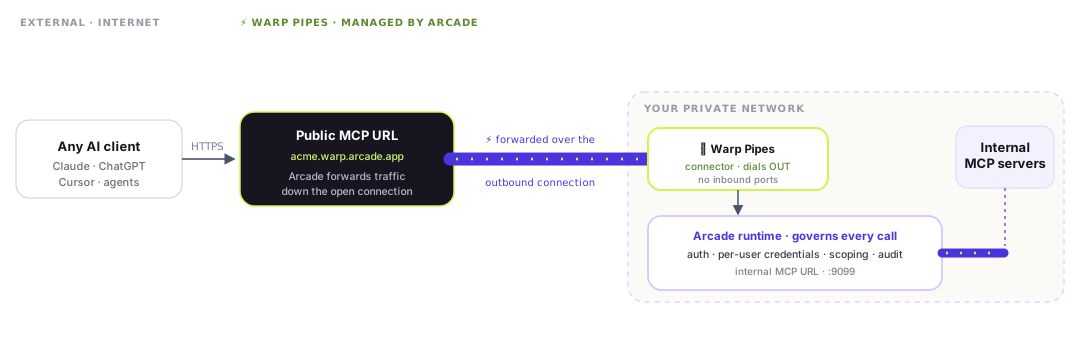
Your Arcade runtime runs as an server inside your private network, on port 9099 by default, and it never faces the internet. You run the Warp Pipes connector alongside it; the connector makes one outbound connection to Arcade. Arcade gives you a public MCP URL and forwards every request down that connection to your runtime.
What Warp Pipes adds, and only this:
- A public URL hosted by Arcade that any AI client connects to.
- Managed forwarding from that URL to your internal runtime.
- An outbound connector in your network that holds the connection open. Nothing inbound is exposed.
Everything behind the connector is the runtime you already have. Warp Pipes does not re-implement authentication, credentials, governance, or audit. It connects clients to the runtime that already does them.
How the runtime works
Two concepts shape every deployment, with or without Warp Pipes:
- Gateways are named paths on the runtime (
/mcp/{slug}). Each gateway has its own auth mode, allow-list, and access rules, so an AI client connecting to/mcp/financesees only finance tools. You create gateways in the Arcade dashboard, not inengine.yaml. - Identity and access — users, organizations, API keys, RBAC, and OAuth — is managed in Arcade. The runtime makes outbound-only calls to it; it never dials the runtime. Multiple runtimes can share one Arcade .
Gateway auth modes
Each gateway uses one of three auth modes. The mode determines what the AI client sends and which clients can connect.
| Dashboard name | Config value | What the client sends | Works with the Anthropic Messages API? |
|---|---|---|---|
| Arcade Auth | arcade_oauth | Bearer JWT issued by Arcade OAuth | Yes |
| User Source | user_source | Bearer JWT from your identity provider | Yes |
| Arcade Headers | arcade_header | Bearer token plus an Arcade-User-ID header | No. The Anthropic connector can’t send custom headers |
For Claude, through the Messages API or managed , use Arcade Auth or . See MCP Gateways for how to choose a mode and User Sources for connecting your own identity provider.
Connect to internal MCP servers
Your internal servers live at private hostnames or IP addresses. Configure the runtime’s SSRF allowlist through your Helm values to tell the runtime which internal addresses it’s permitted to call, then register each URI as a worker.
The runtime calls these servers directly over your private network, by their internal addresses. No inbound ports, and no tunnel, are required.
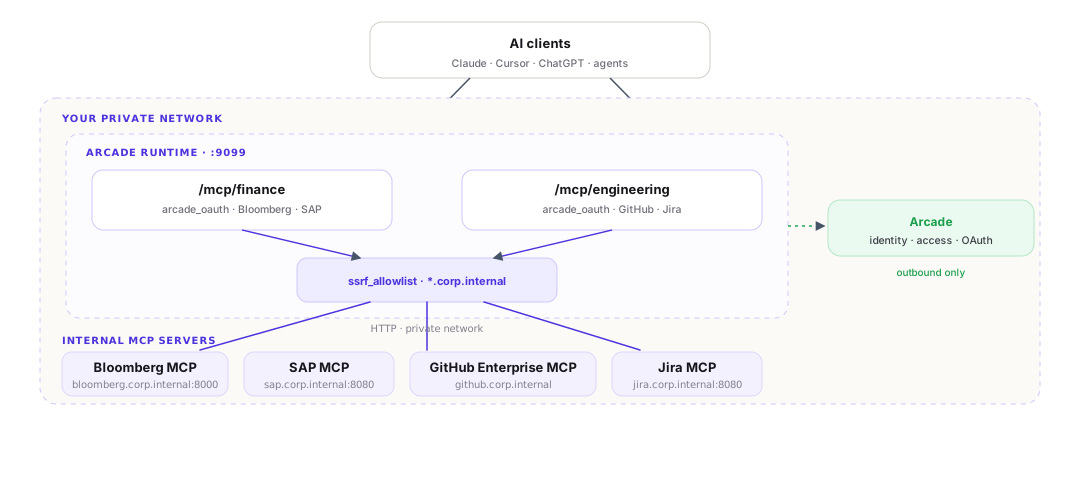
Set the allowlist in your Helm values:
engine:
  ssrfAllowlist:
    - "*.corp.internal"       # any subdomain
    - "10.10.0.0/16"          # IP range
Then register each internal server as a worker so the runtime can route calls to it. For the full set of worker and allowlist values, see the values reference and Self-host with Helm.
Allowlist entry types
| Type | Example | Evaluated | Matches |
|---|---|---|---|
| Exact host | https://host.corp:8080 | Before DNS | Scheme, host, and port exactly |
| Wildcard | *.corp.internal | Before DNS | Any matching subdomain |
| CIDR | 10.10.0.0/16 | After DNS resolution | IPs in the range |
Keep these rules in mind when you write allowlist entries:
- URIs must use
http://orhttps://. The runtime rejects other schemes at startup. - A wildcard such as
*.corp.internaldoes not match the bare apexcorp.internal. Add the apex separately if the runtime needs to reach it. - CIDR entries match against the resolved IP. For split-horizon DNS, where a hostname resolves to different IPs inside and outside the network, use exact-host or wildcard entries instead.
- Malformed entries cause the runtime to fail at startup.
Set the allowlist with --set
You can also set the allowlist imperatively when you install or upgrade the chart:
helm upgrade arcade oci://public.ecr.aws/s5i6x9d1/charts/arcade \
  --set engine.ssrfAllowlist[0]="*.corp.internal" \
  --set engine.ssrfAllowlist[1]="10.10.0.0/16"
Verify the connection
Use the worker test endpoint in the Arcade dashboard. A successful test confirms the allowlist entry is correct and that the runtime has a network path to the server.
Deploy across multiple networks
For multiple business units or regions, deploy a separate runtime per network. Each runtime has its own ssrf_allowlist scoped to the servers in that network, and all runtimes share one Arcade for identity and access.
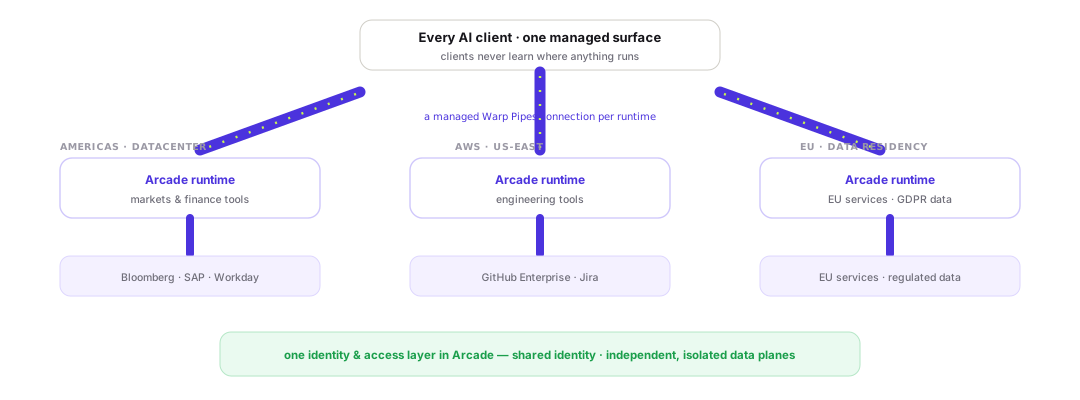
A typical topology assigns one runtime to each network:
| Deployment | Network | ssrf_allowlist | MCP servers |
|---|---|---|---|
finance-nyc | NYC datacenter | 10.10.0.0/16, *.finance.corp.internal | Bloomberg, SAP, Workday |
engineering-use1 | AWS us-east-1 | 10.20.0.0/16, *.eng.corp.internal | GitHub Enterprise, Jira |
eu-euw1 | AWS eu-west-1 | 10.30.0.0/16, *.eu.corp.internal | EU APIs, GDPR-scoped data |
This topology gives you:
- Network isolation — each runtime can only reach the hosts and ranges in its own allowlist. The finance runtime can’t dial
10.20.x.xeven if it receives a URI pointing there. - Data residency — the EU runtime’s traffic never leaves eu-west-1, and credentials in its vault stay in-region.
- Credential isolation — each runtime holds its own credential vault. A compromise of one runtime exposes no credentials from the others.
- Shared identity — all runtimes make outbound calls to the same Arcade for auth and RBAC. The data planes are independent; identity and access are shared.
Connect each runtime out with its own Warp Pipes URL, or front each with your own reverse proxy.
Bring your own reverse proxy
Warp Pipes manages the connection for you. If you’d rather run the networking hop yourself — or you already operate a reverse proxy or API gateway you trust — Arcade has always worked behind one.
Run a reverse proxy inside your network. It makes one outbound connection, so no inbound ports are needed. External clients connect to the proxy’s public hostname, and the proxy forwards traffic to the runtime internally.
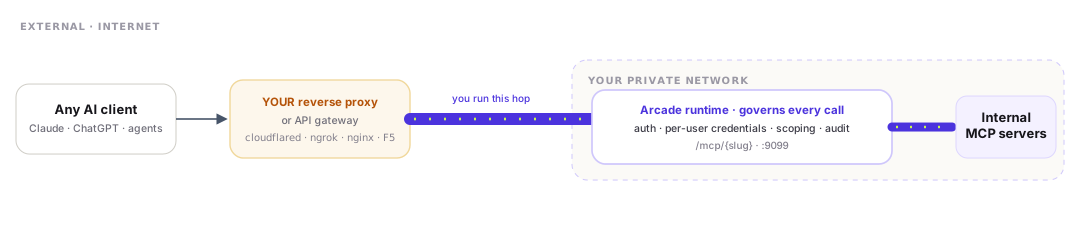
All AI clients see the same RFC 9728 OAuth interface regardless of which proxy you use. The runtime, the governance, and the security model are identical whether the connection is managed by Warp Pipes or by your own cloudflared, ngrok, or nginx.
Cloudflare Tunnel
Cloudflare Tunnel runs cloudflared inside your network and exposes the runtime on a public hostname.
tunnel: <tunnel-id>
credentials-file: /etc/cloudflared/credentials.json
ingress:
  - hostname: arcade.yourdomain.com
    service: http://arcade:9099
- service: http_status:404cloudflared tunnel runExternal clients connect to https://arcade.yourdomain.com/mcp/{gateway-slug}.
Required proxy headers
Whichever proxy you use, verify these headers pass through unchanged:
| Header | Purpose | What breaks if stripped |
|---|---|---|
Authorization | OAuth bearer token | Auth fails; the runtime returns 401 |
Mcp-Session-Id | Session continuity | Each request starts a new session |
MCP-Protocol-Version | Protocol negotiation | Connection errors with strict clients |
The path /mcp/{slug} must also pass through intact. The runtime routes by gateway slug from the path.
Client compatibility
| Client | Connectivity | Auth mode |
|---|---|---|
| Claude (Messages API or managed agents) | Warp Pipes or any proxy | Arcade Auth or User Source only |
| Cursor, Cline, Claude Desktop | Warp Pipes or any proxy | All modes |
| ChatGPT, OpenAI agents | Warp Pipes or any proxy | All modes |
| Custom agents | Warp Pipes or any proxy | All modes |
Known limitations
| Item | Notes |
|---|---|
| Arcade Headers with the Anthropic Messages API | Not compatible. The connector supports only authorization_token, with no custom headers. Use Arcade Auth or User Source. |
| nginx buffering (bring-your-own proxy) | proxy_buffering off is required. Without it, nginx buffers streamed responses and clients never receive them. |
Mcp-Session-Id pass-through (bring-your-own proxy) | Verify your proxy forwards this header. Stripping it silently breaks session continuity for streamable HTTP clients. |
| Wildcard apex mismatch | *.corp.internal does not match corp.internal. Register the apex separately if the runtime needs to reach it. |
| CIDR with split-horizon DNS | CIDR entries match against the resolved IP. If a hostname resolves to different IPs inside and outside the network, use exact-host or wildcard entries instead. |
Next steps
- Self-host with Helm for the full configuration reference
- Create an MCP Gateway to scope and auth for each client
- Set up a User Source to authenticate end with your own identity provider
- Connect your MCP client to a gateway URL